You can find the wrong defaults in your schema markup and switch them off in about 15 minutes, without a developer.
AI search is changing how buyers find B2B software, but most marketing teams have never read the code that describes their company to machines. A plugin or website builder usually wrote that code, and nobody checked it. A schema markup audit is how you check it, and all you need is two free tools and a few pages.
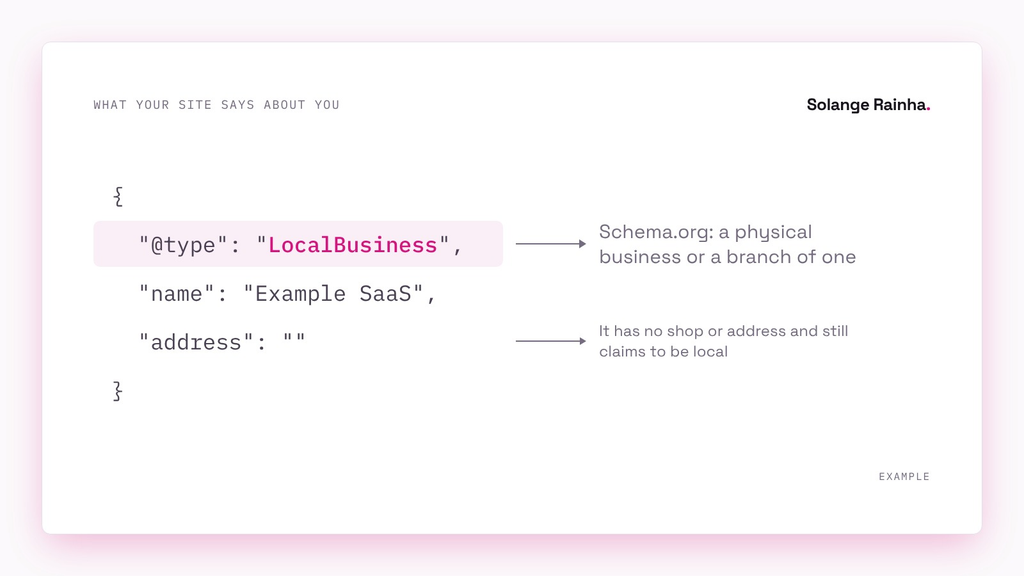
What’s schema markup, and where does yours come from?
Schema markup (Google’s documentation calls it structured data) is a block of code in a page’s HTML that describes the page and the company behind it, in a shared vocabulary that Schema.org publishes. Most sites write it in JSON-LD (JavaScript Object Notation for Linked Data). The JSON-LD script never shows to visitors and tells Google, for example, “this page is a BlogPosting, written by this Person”. My guide to writing content AI tools cite covers the text visitors do see.
Very few marketing teams wrote their schema markup on purpose: it comes from the theme, an SEO plugin, the builder’s settings or an old snippet. Each source’s default suits the average site that uses it, which is more often a restaurant than a software company, so some of those sources add LocalBusiness (the Schema.org type for a physical business) by default.
| Platform | What it adds by default | What adds the wrong type | Where you change it |
|---|---|---|---|
| Wix | Wix adds LocalBusiness to the homepage. | Typing a business name and address into Business Info adds LocalBusiness (Wix). | You’ll find the schema markup in the SEO settings, under structured data markup. |
| Squarespace | Squarespace adds Organization and LocalBusiness, among other types. | Any entry in the Business Information panel adds LocalBusiness (Collaborada). | Code injection (the field where Squarespace lets you paste custom code) takes your own markup. |
| WordPress with Rank Math (an SEO plugin) | Rank Math adds Article to both posts and pages (Rank Math). | Leaving the default schema for Pages unchanged keeps Article on pages. | Go to Titles & Meta for each content type, and to Local SEO. |
| Webflow | Webflow adds nothing until you add schema yourself (Webflow). | Old custom code and copied templates add it. | Page settings has a schema markup field. |
Squarespace’s default is the hardest to undo: a studio that builds on Squarespace warns that once you type anything into Business Information, the LocalBusiness markup stays after you clear every field. Collaborada had already reported the same problem to Squarespace back in 2019.
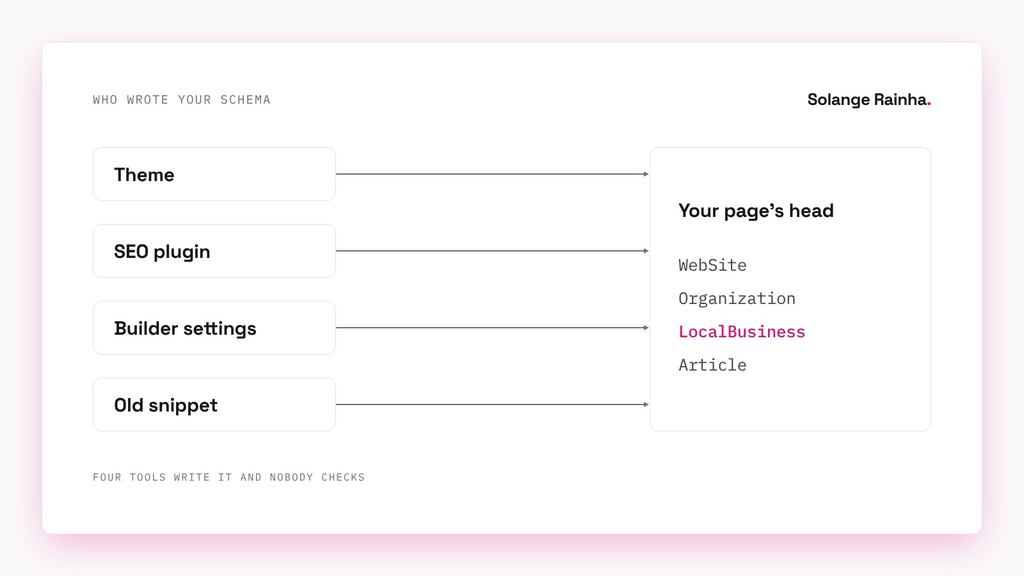
Why does the wrong schema type cause problems?
Schema.org keeps LocalBusiness for a physical business or a branch of one, like a restaurant or a bank branch, and a SaaS company with a registered office isn’t that. Google’s Organization documentation (September 2026) only points you to LocalBusiness subtypes when the site is about a restaurant or a physical store. Google’s structured data policies (July 2026) say markup must be “a true representation of the page content”, and a page that breaks those policies can lose its rich results (the extras, like star ratings, that Google adds to a search listing).
I think wrong schema markup is a bigger risk than none on a B2B SaaS site, because a machine with no markup to read works out what you do from your pages, while wrong markup has you telling it, in its own vocabulary, that you’re a shop. In a past role I overhauled 40+ brand assets against one standard, and schema markup belongs in that kind of cleanup as much as a claims register does.
How do I do a schema markup audit?
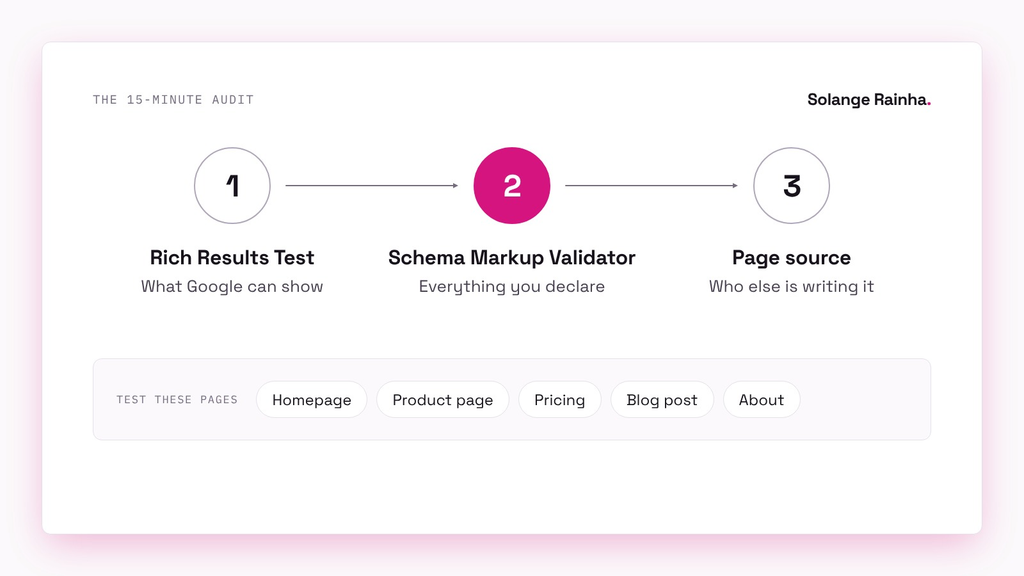
Test five pages, since they usually use different templates: the homepage, one product page, pricing, one blog post and the about page. Start with Google’s Rich Results Test, which shows which Google rich results a page can generate. The Rich Results Test only reports the types Google uses for rich results, so a wrong LocalBusiness can pass without a mention.
The Schema Markup Validator is the one to trust here, because it shows every Schema.org type the page declares without Google’s filter. After the validator, open the page source (the HTML behind the page) and search for application/ld+json, the label at the start of every JSON-LD block. If two of those blocks describe your company and only one has an @id (a fixed ID that tells machines that two blocks describe the same company or page), two tools are usually writing schema markup at the same time.
What did I find on my own site and at work?
I did the audit on my own site first, because I didn’t want to write about a problem I hadn’t looked for myself. My site uses WordPress with Rank Math, and Rank Math’s site entity (the person or company the whole site describes) had the name “Solange Rainha – Content Marketing Manager”, which put a job title inside my name. The homepage also had a Person type for me, with no link to that site entity. I’d added a Person type to the homepage myself, and it pulled Rank Math’s SEO title variable into its name field, so that Person had my SEO title as its name.
I fixed the site entity’s name in Rank Math’s Local SEO settings and added LinkedIn as a sameAs link (the property that points machines to your profiles on other sites). I deleted the homepage Person type instead of editing it, since two unlinked people with one name are harder for Google to read than one. My audit of my content library does the same kind of check on the articles themselves.
At the B2B SaaS company I work for now, I wrote all of the website’s schema markup (my results page has the AI search baseline I set up there too). I wrote one Organization with a stable @id, the product as a SoftwareApplication with its plans, a Person for each team member that links back to the company, and FAQ markup only on the pricing page, where visitors can see the questions. The website builder still prints its own LocalBusiness block above all of my schema markup, and it fills that block from a business information panel. That LocalBusiness block is the default I named this article after.
Which wrong defaults show up most on SaaS sites?
LocalBusiness on a software company is the most common one, and it nearly always starts when someone types an address into a website builder during setup. A missing Organization type leaves Google with no single entity to attach your logo and profiles to. Duplicate Organization types cause the same problem when the platform outputs one and you wrote another without a shared @id.
When a pricing page carries the Article type, a plugin default put it there, and a pricing page isn’t an article. The last wrong default I see often is author markup that doesn’t point to any page or profile. Google’s Article guidelines (September 2026) ask for only the person’s name in author.name and a url or sameAs that shows who they are. Plenty of sites output a bare name instead, or an author page that gives a 404 error.
What’s the right minimum schema for a B2B SaaS site?
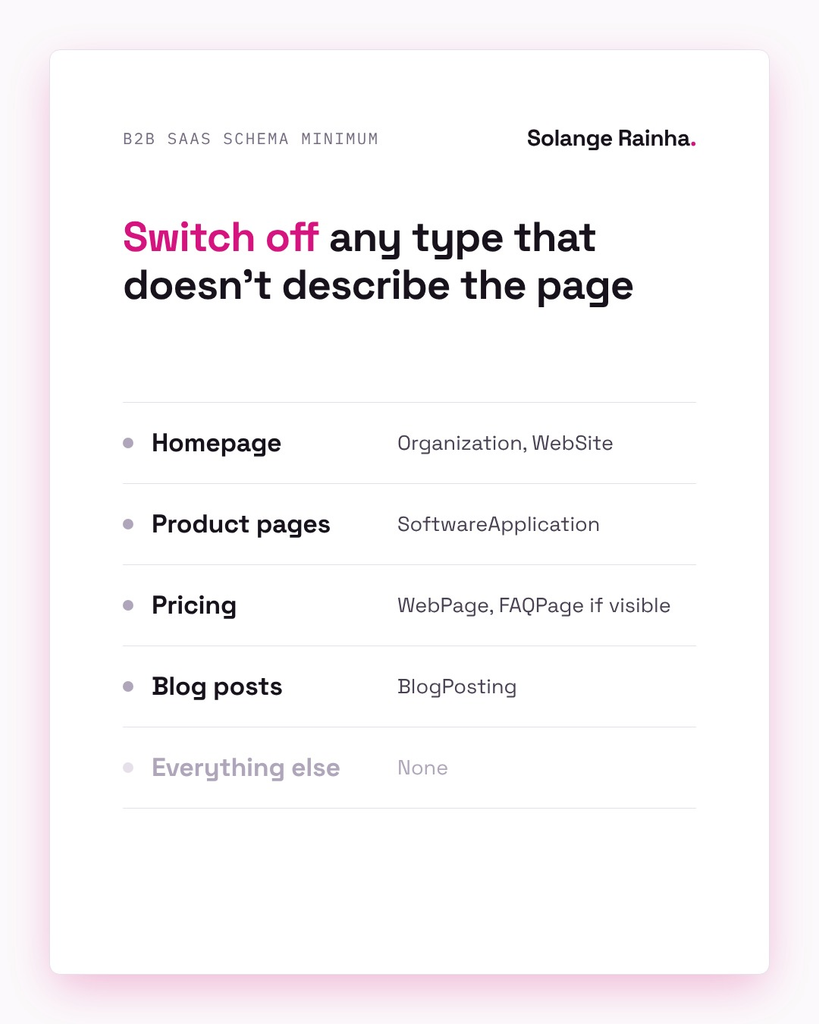
Every schema type should describe content a visitor can see on that page, so switch off any type you can’t justify that way.
| Page | What to add |
|---|---|
| Homepage | Organization and WebSite belong here. Get the name, url, logo and sameAs (LinkedIn, G2, Crunchbase) right, and reuse one @id everywhere. |
| Product and feature pages | SoftwareApplication fits, or WebPage if you want to keep the markup plain. Fill in name and applicationCategory (the kind of software), and add offers (the plans and prices) only if the page shows prices. |
| Pricing | Use WebPage, plus FAQPage if visitors can see the questions. Leave out any ratings or prices the page doesn’t show. |
| Blog posts | BlogPosting is the type to pick. Give the author a url or sameAs, and point publisher (the property that names who published the post) to the Organization @id. Add the dates the post went live and last changed as well. |
| Every page | BreadcrumbList should match the breadcrumb trail visitors see (the row of links that shows a page’s place in the site). |
| Everything else | Leave schema off, since switching a type off counts as a fix. |
How do I fix schema without a developer?
In WordPress with Rank Math, you’ll find the site entity and each content type’s default schema in Titles & Meta. Set Pages to None or WebPage there, and check your homepage’s Schema tab for anything someone added by hand. Wix lets you edit or remove markup in the SEO settings for each page type, and you should leave your street address out of Business Info if nobody visits it. On Squarespace, add a correct Organization through code injection and accept that the old LocalBusiness block might stay. Webflow’s schema field won’t check your code, so Webflow’s help page sends you to the Schema Markup Validator.
Does schema markup help AI tools cite you?
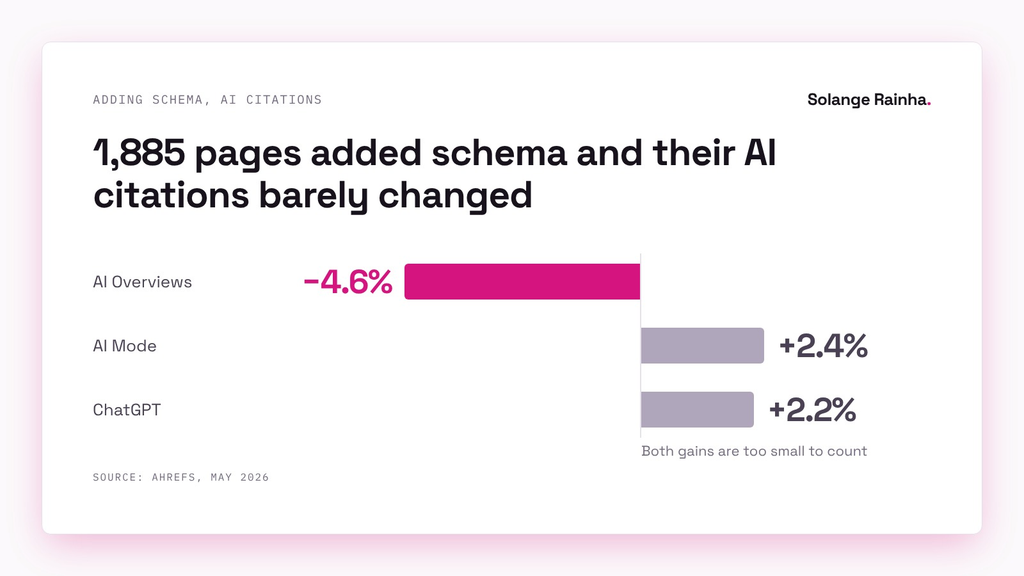
Schema markup helps AI citations far less than the people selling it claim. Ahrefs tracked 1,885 pages that added JSON-LD against 4,000 control pages and reported in May 2026 that citations in Google AI Overviews fell 4.6%, while AI Mode (+2.4%) and ChatGPT (+2.2%) gained too little to tell apart from zero. Every page in the study already had over 100 AI Overview citations, so the study can’t say whether schema markup helps pages AI tools haven’t found yet.
“If you’re already doing the rest of the SEO work well, JSON-LD isn’t going to be the unlock.” Louise Linehan and Xibeijia Guan, Ahrefs, May 2026
Google’s AI features guide (December 2025) agrees: it says there’s “no special schema.org structured data that you need to add”, but asks that your markup match the visible text. Google’s advice fits what I found testing whether llms.txt works, where machine-only files got plenty of attention but the text visitors see was what got pages cited.
Schema markup is still worth having because it gives search engines one consistent entity for your company. My framework for getting content cited by AI tools puts what a page says before how you mark it up, because markup alone can’t fix weak content. If you want to track how often AI tools cite you, check what AI visibility tools actually measure before you buy one.
What goes on a schema markup audit checklist?
Go through this checklist now, and again after every theme change, plugin update, migration or rebuild:
- [ ] The homepage declares one Organization (or Person, for a personal site) with the actual name and logo, and with sameAs links to your profiles. The name has no job titles or slogans in it.
- [ ] No page calls you a LocalBusiness unless customers visit an address.
- [ ] Only one block describes the company, or every block shares one
@id. - [ ] Your product and feature pages don’t use the Article type, and neither does pricing.
- [ ] Each blog author has a working url or sameAs.
- [ ] Every FAQ and price in the schema markup also appears on the page, and so do any ratings.
- [ ] The validator lists no type you can’t explain.
What would I do differently?
I’d have read my own schema markup the day I installed Rank Math instead of months later, since the homepage Person came from one field I filled in once and forgot. I’d also have checked the page source after every template change. You don’t need a developer or a paid crawler (an SEO tool that scans your whole site) to start either, you only need the Schema Markup Validator and your homepage, and that takes about two minutes.
Found something odd in your own markup? I’d like to hear what it was, on LinkedIn or at [email protected].
Frequently asked questions
A schema markup audit checks the schema markup your website outputs, to see which types each page declares and whether those types describe what’s on the page. You test the main pages in Google’s Rich Results Test and the Schema Markup Validator, then search the page source for duplicate blocks. On B2B SaaS sites, most audits find at least one wrong default from a tool that writes schema markup for you.
LocalBusiness schema is wrong for a SaaS company unless customers come to that office to buy or get help. Schema.org keeps the type for physical businesses and branches, like a restaurant or a bank branch, and an office where only staff work doesn’t fit. Use Organization instead and put the office in its address property. A company with a walk-in branch can mark up that branch separately.
Schema markup can cost you rich results if it breaks Google’s structured data policies, for example by marking up content readers can’t see. Google says a manual action over schema markup (a penalty Google gives a site by hand) doesn’t affect how a page ranks in web search, though. The bigger risk is wrong markup telling search engines and AI tools wrong facts about your company. Fixing a wrong type usually means changing a setting instead of rebuilding anything.
Most schema fixes don’t need a developer, because the wrong defaults come from settings you can change yourself. WordPress SEO plugins let you edit or switch off markup in their settings, and so do Wix and Webflow, while Squarespace takes custom JSON-LD through code injection. A developer helps when someone hard-coded the schema markup into a custom theme. Retest with the Schema Markup Validator after every change.
FAQ schema still describes question-and-answer content to machines, but Google stopped showing FAQ rich results on 7 May 2026, according to its FAQPage documentation. You don’t need to remove FAQPage markup, as long as visitors can see the questions and answers on the page. Don’t expect FAQ schema to get you AI citations either, since the Ahrefs study above didn’t find that schema markup helps pages AI tools already cite.
A schema markup audit belongs after any theme change, SEO plugin update, builder migration or rebuild, and once a year otherwise. Defaults change when tools update, and a setting someone filled in during setup can keep adding markup for years. Check the homepage, a product page, pricing, a blog post and the about page each time, and write down what you found so the next audit is quicker.